Daycare waitlist & classroom-transition software
See next year's classrooms today.
A waitlist that stays real, a page that tells parents they haven’t been forgotten, and a clear view of when each room opens and who’s next. Retire your color-coded spreadsheet.
- Bring your spreadsheet. You’re set up in a minute or less.
- Free for 30 days, no card.

Openings shows when each room frees a spot, and which waiting families fit it.
We are working on one person managing the enrollment at our 9 centers. This is only possible because of this brilliant program.
Works alongside Procare, Brightwheel and the rest
Keep your center software. Seedlist plans who's in each room, and when.
Seedlist is daycare waitlist software, and it works alongside the software you run every day. There's nothing to switch.
- Applicationsfrom your own form
- Waitlistkept current by check-ins
- Openingsmove-ups and when each spot opens
- Offersheld spots and family emails
- Billing and tuition
- Attendance
- Parent messages and photos
How it works
From the first application to the first day.
Four steps, and the work Seedlist takes off your plate at each one.

Apply
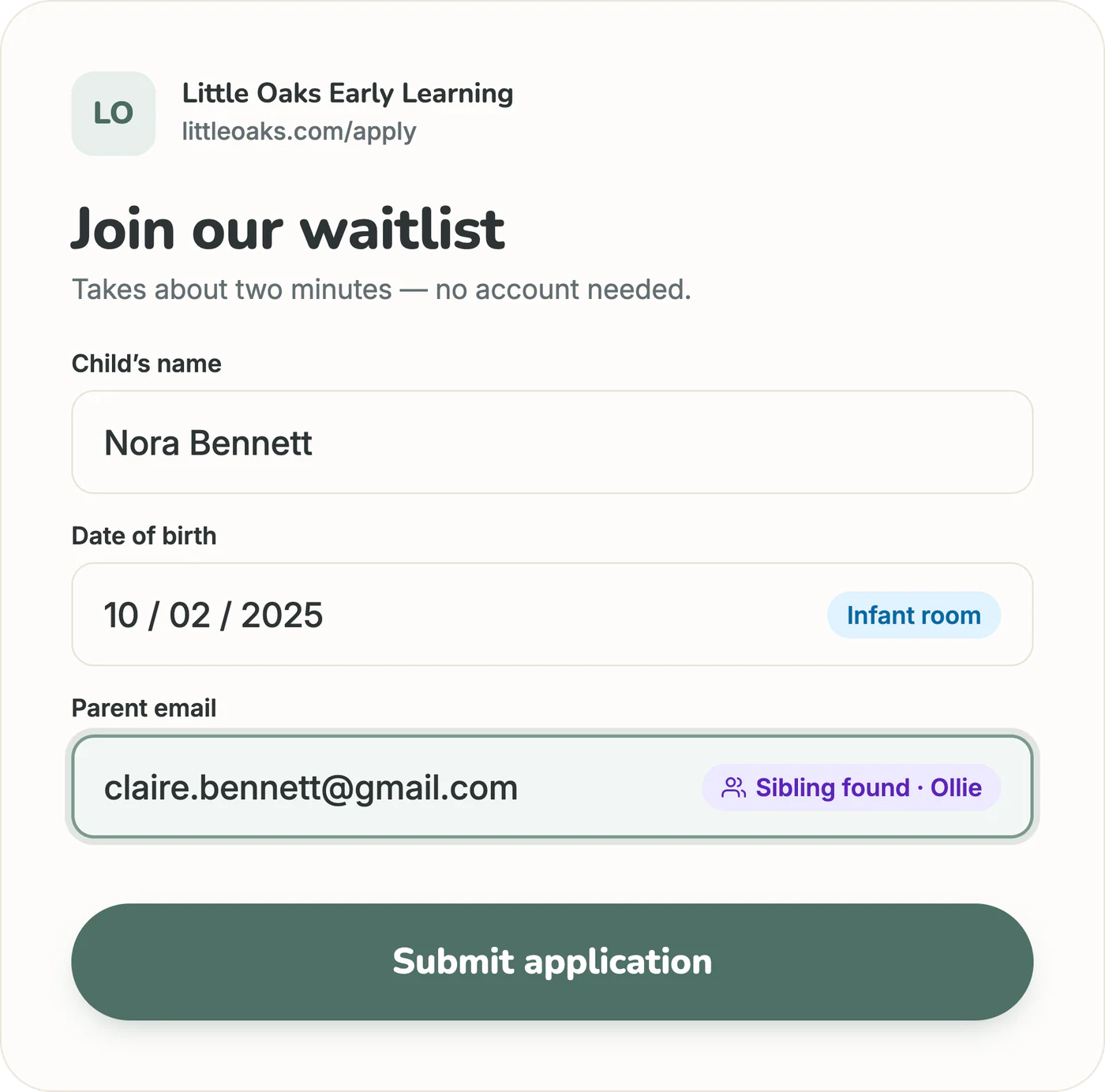
An application parents finish on their phone.
Share one link. Parents apply in about two minutes, on a form with your center's name and your own questions. The moment they're done, they get a status page they can check anytime, and you get an email.
- Up to eight questions of your own
- A confirmation email you write yourself
- Siblings marked when a parent applies again
Family's status pageApplication Received
Waitlist
A waitlist that keeps itself current.
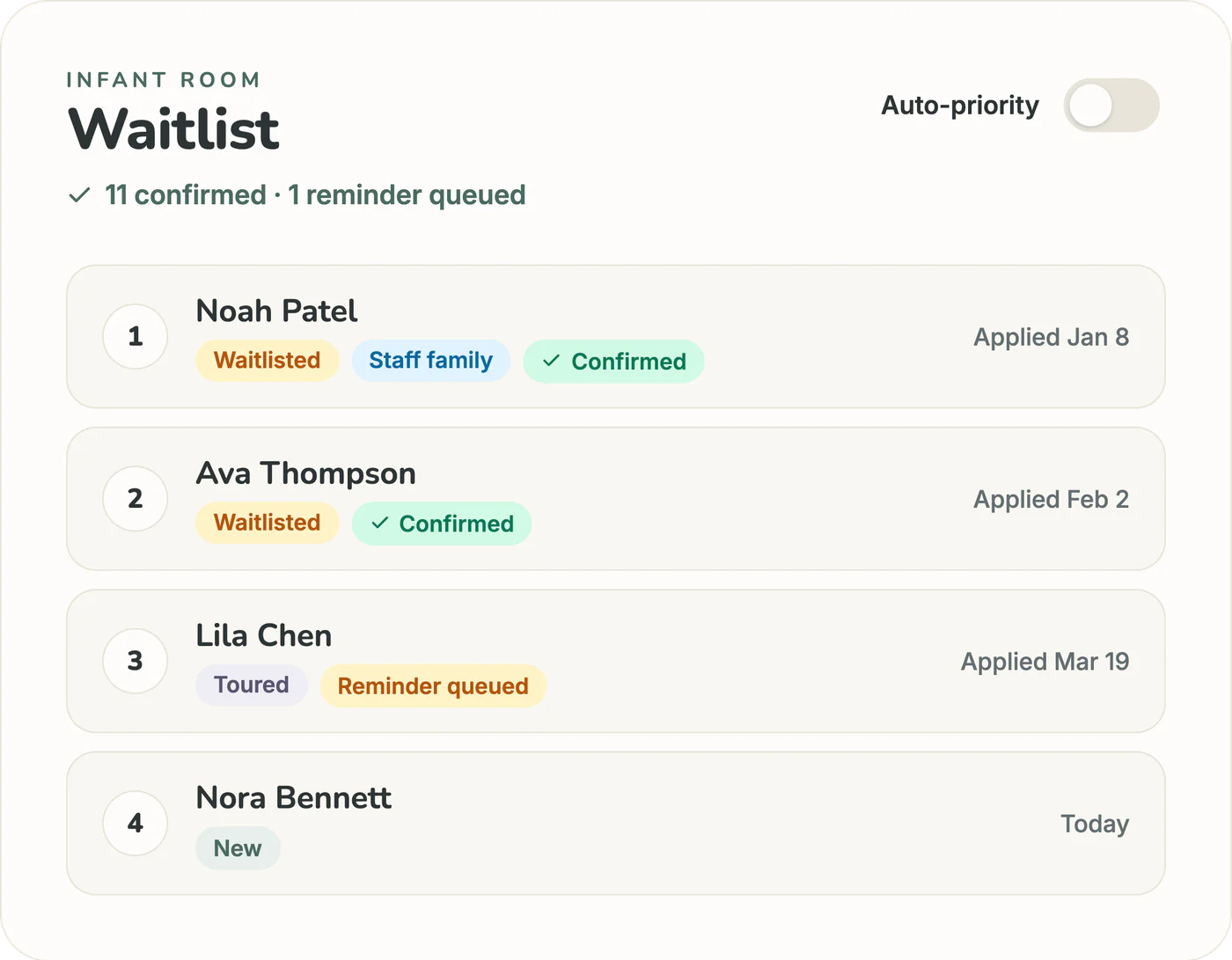
Families land on one list per age group, with your priority families first. Every month, we email waitlisted families to ask if they're still interested, and families who don't answer three check-ins move to your archive. The next family you call still wants the spot.
- Siblings marked for you, and priority families moved up the list
- Notes, tours and every contact in one place
- Your staff can run it too
Family's status pageVerified & Waiting
Plan
See each opening coming, long before it happens.
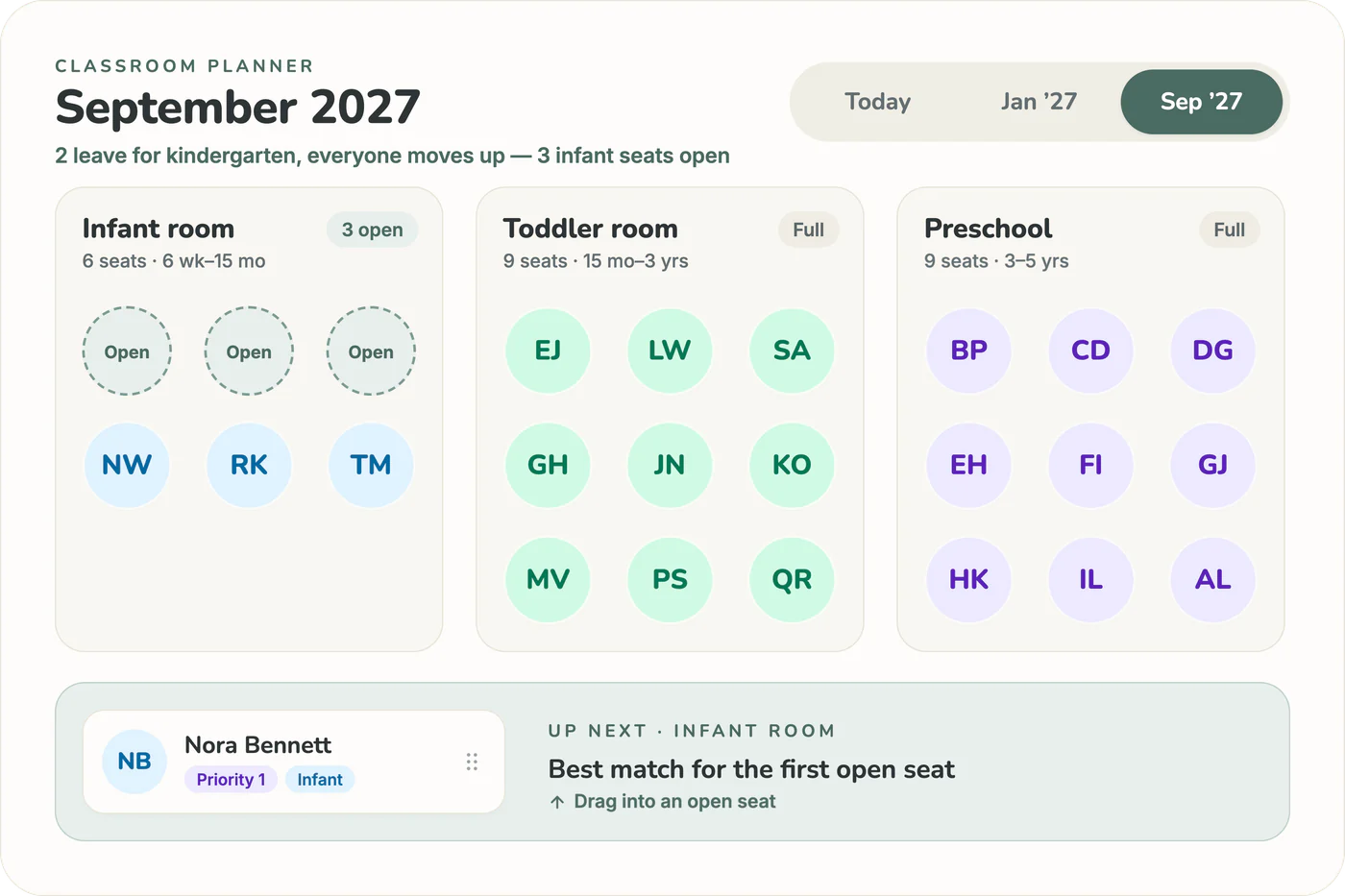
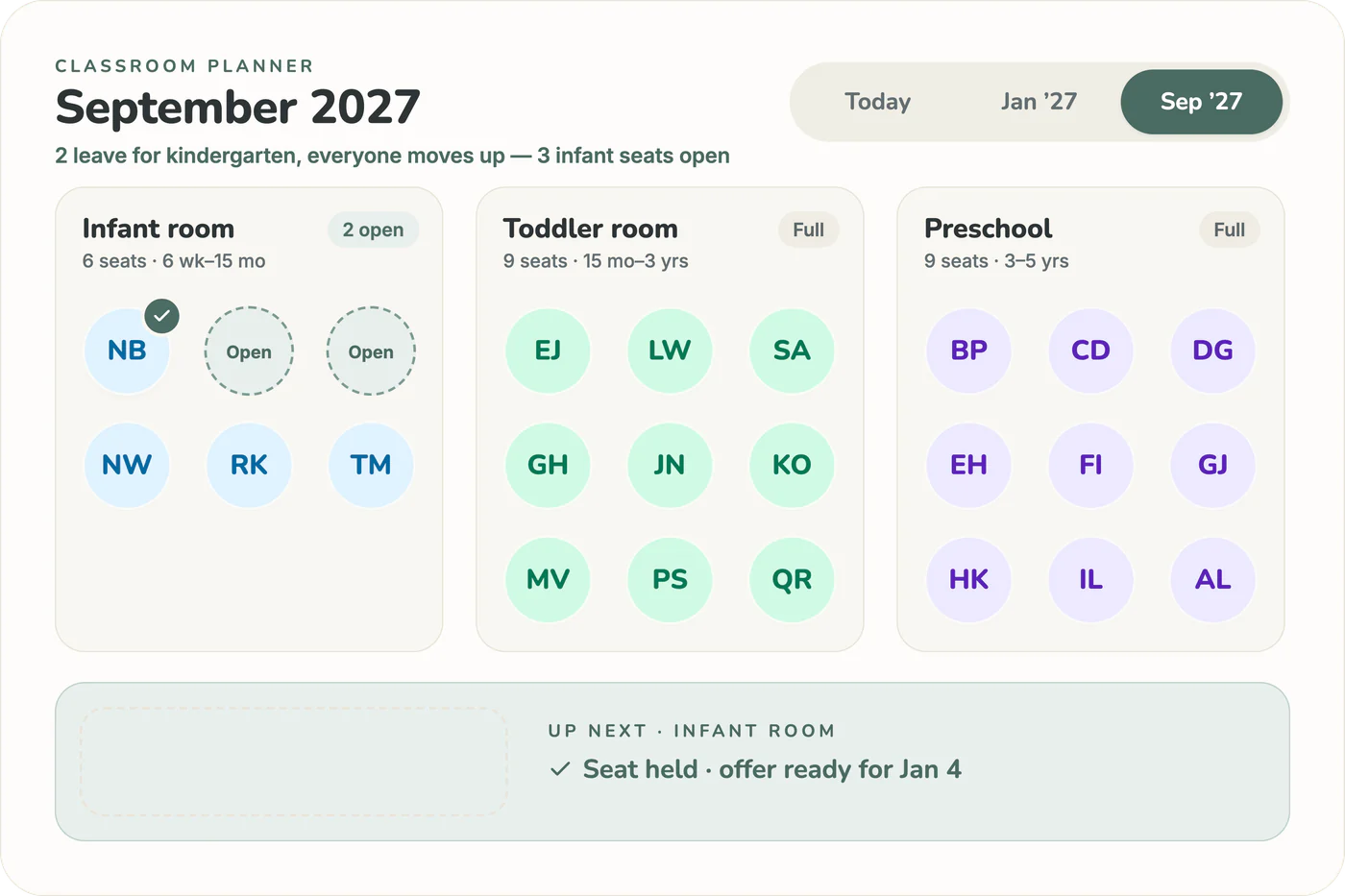
You already know every child's birthday. Seedlist does the math: Openings shows when each room frees a spot, who's moving up, who leaves for kindergarten, and which waiting families fit. You see it years ahead, not the week it happens.
- Move-ups and kindergarten dates worked out from birthdays
- Your state's ratio rules built in, for guidance
- Plan a move and it's applied on the day
Family's status pageVerified & Waiting

Offer
Offer the spot. The family knows right away.
Hold the spot from a start date, add a note in your own words, and we email the family. Their status page shows the held spot, so nobody has to call to check.
- Offer from the waitlist or straight from Openings
- Or make an offer with a reply-by date
- Enroll them in one step when they say yes
Family's status pageSpot Held · starting Jan 4
And then, the first day.
Once you enroll them, their status page says “Welcome to the Family!”
Free for 30 days, no card.

It has definitely made our organization easier and gives us a great visual of which classrooms are full and which children are needing to age out.
- Before
- A paper waitlist binder
- After
- Every room and age-out at a glance
The honest math
What's an empty seat costing you?
Openings shows a spot coming months before it opens, so the next family is lined up before the seat sits empty. Drag the sliders for a rough sense of what filling a few weeks sooner is worth at your center.
Seedlist is $59 a month. One seat filled a few weeks sooner typically covers the whole year.
Pricing
One price. Every feature.
Seedlist is $59 a month per center, with unlimited families, rooms and staff. Try everything free for 30 days, with up to 100 families on your waitlist (enrolled children don't count). No card, and you can cancel anytime.
- Names and contacts, encrypted
Parent and child names, contact details and notes are encrypted in our database.
- No passwords for parents
Families check their status with a private link. Nothing to forget, no call to make.
- Your list, anytime
Export every family to a spreadsheet whenever you like.
- No contract
No contract on the monthly plan. Cancel anytime from your account.
- Openings and move-up forecasting
- Unlimited families, classrooms & staff
- Status pages and check-in emails for families
- All 50 states' ratio rules built in
30 days free · No credit card · Cancel anytime
For organizations
More than one site? Run every waitlist from one login.
Built for nonprofits, church networks and franchise owners with more than one location. Each site keeps its own list and its own team, and you switch between them without juggling logins.
- One login, every site
Switch between your locations in a click. Each one keeps its own waitlist, rooms and families.
- Each site, its own team
Owners and staff are set per location, so every director runs their own list.
- The right inbox, every time
Choose who at each site gets the email when a family applies.
- Priced per site
We set a per-site price with you, and we'll help you bring every site's list in.
Frequently asked questions about daycare waitlist management
Getting started
How long does it take to set up?
Most directors are up and running in a minute or less: import your spreadsheet in one click, and your classrooms, waitlist, and forecast come to life. Then share your waitlist link whenever you're ready.
Is this secure? We handle children's data.
Yes. All connections are encrypted with SSL, passwords are securely hashed, and parent and child names, contact details and notes are encrypted before they ever reach the database. We never sell family data, and we share it only with the services that run Seedlist, like our email and database providers, as our Privacy Policy lists. Your data is yours.
Can I use this on my phone?
Absolutely. Seedlist is fully responsive: bottom tab navigation, touch-friendly drag-and-drop, and a layout designed for checking between classroom visits.
What happens when my trial ends?
You subscribe for $59 a month, or your account pauses: you can still see your list, but you can't add families and your application form stops taking new ones. We keep a paused account's data for 90 days, or delete it sooner if you ask. No surprise charges, no awkward sales calls.
Can I see it in action before signing up?
Yes. Start a free trial and you'll have a working pipeline in a minute or less. You can also book a free 15-minute walkthrough with our team.
Next to your other software
Do I need to replace my current center management software?
No. Seedlist is designed to work alongside your current tools. Keep your billing software for billing, attendance and parent messages; Seedlist handles the waitlist and plans your rooms. Think of it as a specialist, not a replacement.
My billing software already has a waitlist feature. Why would I need Seedlist?
Many billing platforms include a waitlist as one feature among many. Seedlist is built around it: automated check-ins, Openings forecasts that show when each room frees a spot, and a status page for every family. If you're managing workarounds in a spreadsheet alongside your main software, Seedlist replaces the spreadsheet, not your billing tool.
I've seen waitlist tools for $15/mo. Why is Seedlist more?
Those tools are digital clipboards: they work for restaurants and salons just as easily as daycares. Seedlist is built specifically for childcare. It understands age-based transitions, classroom ratios, staffing capacity, and kindergarten departures. It doesn't just store your list. It tells you what to do next.
What's the difference between daycare waitlist software and childcare management software?
Childcare management platforms like Procare and Brightwheel focus on billing, attendance, and parent communication for enrolled families, and some now add waitlist and enrollment-planning tools. Waitlist software like Seedlist is purpose-built for filling rooms: priority tiers, age-based classroom matching, occupancy forecasting, and automated follow-ups. Many centers use both: one for running the center, one for filling it.
Running a waitlist
How does Seedlist handle classroom transitions and move-ups?
Seedlist tracks every child's age against your room ranges and flags move-ups before they happen: infant-to-toddler, toddler-to-preschool, pre-K to kindergarten. Move a child yourself in a couple of taps, or plan the move for a date and Seedlist applies it that day. Openings then shows the spot they leave and suggests the waiting families who fit it. The whole cascade of openings a single move-up creates is mapped months ahead, so you're not doing birthday math to find the next one.
Can Seedlist forecast when classroom move-ups will open seats?
Yes. Because each child's transition date is built into their birthday, Seedlist projects which rooms will free up and when, including the chain reaction where one move-up opens a seat in the room below it. You see the openings months out, matched to the waitlist families who fit, so you fill from the bottom of the cascade before September instead of scrambling in the fall.
What is daycare waitlist management software?
Daycare waitlist management software helps childcare centers organize, track, and act on their waiting lists. Instead of juggling spreadsheets and sticky notes, directors get a visual pipeline that shows every family's status, automates follow-ups, and forecasts when seats will open. Seedlist is an example built specifically for childcare. It understands age groups, classroom transitions, and enrollment timing in ways generic waitlist tools don't.
How do I manage a daycare waitlist without a spreadsheet?
Dedicated waitlist software replaces the spreadsheet entirely. You get a drag-and-drop pipeline where families move through stages, from application to enrollment, with automated status updates, follow-up reminders, and a parent-facing portal so families can check their status without calling. The result is less manual tracking and fewer families slipping through the cracks.
How long do families typically wait on daycare waitlists?
Wait times vary widely by area and age group, and infant spots usually have the longest waits. In competitive markets, some families join waitlists before their child is born. Software helps directors manage that long window by automating check-ins, tracking which families are still interested, and forecasting when openings will actually happen, so spots get filled sooner.
How do I forecast enrollment at my daycare?
Enrollment forecasting looks at your current roster, upcoming departures (kindergarten transitions, aging out, last days families have told you about), and the start dates of spots you're holding, to estimate how many seats will open each month. Seedlist builds this forecast automatically from your real data. No spreadsheet formulas required. Directors use it to plan staffing, anticipate revenue gaps, and know when to reach out to waitlisted families.
How does Seedlist handle staff-to-child ratio requirements?
Seedlist has the staff-to-child ratio rules for all 50 US states plus DC built in. During setup, you select your state and it loads the requirements automatically, with no need to look up your state's administrative code. When you enter how many staff work in a room, Openings works out that room's capacity from your staff, the ages of the children in it, and your state's rules for mixed-age groups. When Openings suggests a waiting family, it flags any match that would push the room over ratio, so you see it before you make the offer. The rules are there for guidance; every enrollment decision stays yours.
What do parents see?
Parents get a simple status page showing where they are: "Application Received," "Verified & Waiting," "Spot Offered," "Welcome to the Family." No queue numbers, no anxiety-inducing rankings. Just clear, calm updates they can check anytime from their phone.
Can I automate waitlist follow-ups with families?
Yes. Seedlist sends automated "still interested?" check-ins to waitlisted families on a schedule you control: every 30 days and three tries, unless you change them. Families confirm in a couple of taps. Anyone who doesn't respond is marked "No reply" on your list, and after the third unanswered check-in they move to your archive, where you can restore them. This keeps your list accurate without hours of phone calls, so you're not offering a spot to a family that moved on months ago.
How do I handle sibling priority on a daycare waitlist?
Many centers give priority to siblings of currently enrolled children, but tracking this manually is error-prone. Seedlist lets you define priority tiers (sibling, employer partnership, alumni, or any custom category), marks siblings automatically when a parent applies again with the same email, moves priority families up the list, and filters your waitlist to a tier in one tap.
Free resources for directors
Start with the list you already have.
Drop in the spreadsheet you use today. We sort out the columns, find your rooms and show you when each one next has a spot. Free for 30 days, no card.
Rather not set it up yourself? Ask us, and we'll import your list with you.